
AI AUTOMATION & AGENT SYSTEMS: BUILD 8 PRACTICAL WORKFLOWS
Learn how to build practical AI automations and agent systems at your own pace
Go from automation basics to building real AI-powered workflows for business, work, and client services.
Inside this self-paced course, you will learn how automation works, how AI changes what workflows can do, how AI agents differ from basic automations, and how to build practical systems for leads, email, opportunities, customer intake, business operations, content, video, bookings, and more.
No coding required. Start immediately. Learn at your own pace.
Need personalized help later?
WHAT YOU GET INSIDE THE COURSE
This is not just a collection of automation videos.
You will get:
- Step-by-step, on-demand video lessons
- 8 practical AI automation and agent systems
- Automation fundamentals for complete beginners
- Real workflow demonstrations
- Ready-made templates for selected systems
- Zapier and Make automation examples
- AI prompts and workflow logic
- Testing and troubleshooting guidance
- Alternative workflow configurations
- Human-review and safety considerations
- Practical examples you can adapt to your own work
- Optional personalized implementation support if you need it
You do not need to know how to code.
You do not need to be a tech expert.
You only need a laptop, internet access, and a process you would like to make easier.
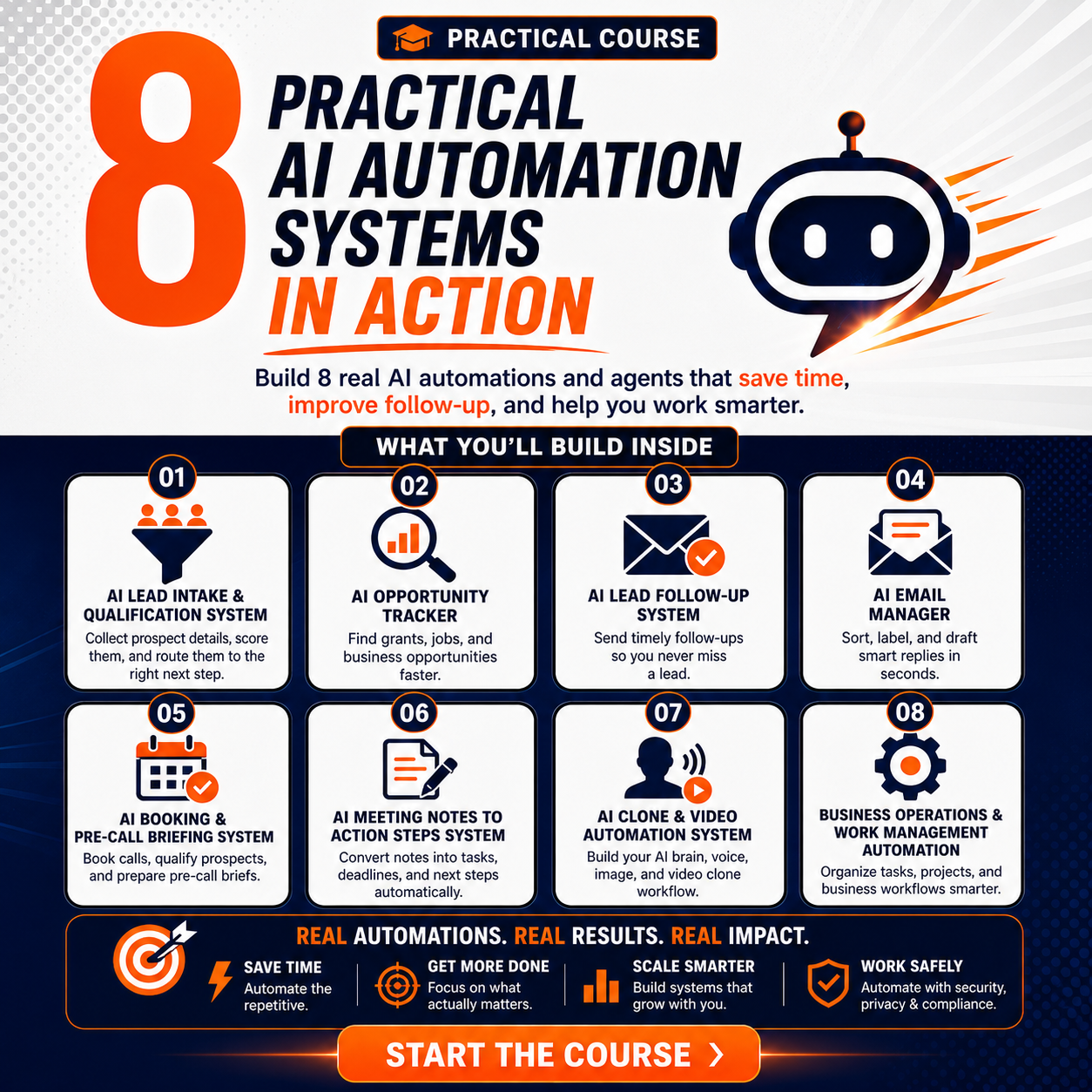
SEE SOME OF THE AI AUTOMATIONS YOU WILL LEARN TO BUILD
START WHEN YOU ARE READY
Format: Self-Paced Online Course
Access: On Demand
Core Systems: 8 Practical AI Automation & Agent Systems
Coding Experience: Not Required
Templates: Included for selected systems
Start Date: Immediately after enrollment
Learning Pace: Yours
THIS IS NOT ANOTHER COURSE YOU WATCH AND FORGET
Many AI courses show you tools.
They tell you what AI can do.
Then they leave you to figure out how to turn those tools into an actual working system.
This course focuses on something different:
Learn how the system works.
You will see:
- What triggers an automation
- How information enters the workflow
- How AI reads and interprets information
- How different tools connect
- How the workflow makes decisions
- How data is stored
- How draft responses are created
- How alerts and tasks are generated
- Where human review should remain
- How filters and routers control workflow logic
- How to test the system
- How to identify and fix common problems
- How to adapt a workflow to a different business use case
The goal is not simply to copy what I build.
The goal is to help you think like an automation builder.
GO FROM BASIC AUTOMATION TO AI AGENTS
LEVEL 1: Basic Automation
Learn how a trigger starts a workflow and how one action can automatically create another.
LEVEL 2: AI Automation
Add AI so information can be analyzed, summarized, classified, scored, or transformed before the next action happens.
LEVEL 3: AI Agents
Understand systems that can work toward a goal, use tools, evaluate information, and take multiple steps.
THEN BUILD REAL-WORLD SYSTEMS
Leads • Email • Opportunities • Voice • Customer Support • Business Operations • Content • Video • Bookings
THE 8 PRACTICAL AI AUTOMATION & AGENT SYSTEMS
1. AI LEAD INTAKE, QUALIFICATION & FOLLOW-UP SYSTEM
Build a system that helps you capture, analyze, qualify, organize, and follow up with leads.
You will learn how to:
- Collect prospect information
- Analyze form responses
- Score leads
- Separate routine leads from stronger opportunities
- Save lead information
- Prepare personalized responses
- Create alerts for important leads
- Keep human review where necessary
- Track follow-up activity
READY-MADE TEMPLATES INCLUDED
Choose from:
Gmail + Google Sheets
Outlook + Google Sheets
Outlook + Airtable
2. AI OPPORTUNITY INTELLIGENCE SYSTEM
Build a system that helps you discover, evaluate, organize, and track useful opportunities.
Use it for:
- Grants
- Jobs
- Scholarships
- Fellowships
- Funding
- Contracts
- Business opportunities
- Other relevant openings
You will learn how to:
- Search for opportunities
- Evaluate relevance
- Score opportunities
- Store promising matches
- Track deadlines
- Organize links and notes
- Prepare follow-up actions
- Create opportunity digests and alerts
3. AI EMAIL MANAGER
Build an AI-powered inbox workflow that helps you manage incoming email without giving AI uncontrolled permission to send messages.
You will learn how to:
- Analyze incoming messages
- Categorize emails
- Add labels
- Summarize messages
- Identify emails requiring attention
- Prepare draft replies
- Schedule processing
- Prevent duplicate processing
- Keep human review before sending
Ready-Made Gmail Template Included
You can begin with the template and use the course to understand, configure, and customize it.
4. AI VOICE & CHAT INTAKE SYSTEM
Build a system that can collect and understand information from people who contact a business through voice or chat.
You will learn how to:
- Ask useful questions
- Collect contact information
- Understand what the person needs
- Qualify inquiries
- Save responses
- Create summaries
- Route information to the right next step
- Alert the appropriate person or team
5. BUSINESS OPERATIONS & AI ASSISTANTS
Learn how AI assistants can support everyday business work.
You will explore systems for:
- Business operations
- Customer support
- Data analysis
- Sales analysis
- Stock and inventory analysis
- Task management
- Internal information processing
The goal is to understand how AI can move beyond chatting and become part of an actual workflow.
6. AI VIDEO AUTOMATION
Learn how AI tools can work together to create a practical video-production workflow.
You will explore how to:
- Create and organize video ideas
- Develop draft scripts
- Work with AI-supported voice and avatar tools
- Connect different AI media tools
- Move content through a repeatable workflow
- Reduce the manual work involved in video production
7. AI CONTENT & BLOG AUTOMATION
Build workflows that help move content from an idea or source into a structured draft and repeatable publishing process.
You will learn how to:
- Organize content inputs
- Use AI to support drafting and transformation
- Create repeatable content workflows
- Move information between tools
- Reduce repetitive content-production steps
- Adapt the workflow to different content use cases
8. AI BOOKING, QUALIFICATION & PRE-CALL INTELLIGENCE PIPELINE
Build a multi-stage workflow that begins when someone books a meeting and prepares useful information before the call.
You will learn how to:
- Capture booking details
- Collect qualification information
- Analyze the prospect's responses
- Research the person or organization where appropriate
- Prepare a pre-call brief
- Save and organize meeting information
- Create reminders and next steps
- Connect multiple scenarios into one larger business workflow
BONUS: MORE THAN 8 WORKFLOWS: LEARN HOW TO THINK LIKE AN AUTOMATION BUILDER
The course does not only show you what to build. You will also learn the underlying skills needed to design and troubleshoot workflows of your own.
You will learn how to:
- Turn a manual process into a workflow
- Decide what should and should not be automated
- Choose between different automation approaches
- Build multi-step workflows
- Use filters and routers
- Map information correctly
- Work with structured AI output
- Prevent duplicate processing
- Test automations
- Identify common workflow errors
- Clean up a workflow before launch
- Adapt an existing system to a new use case
The goal is not to memorize eight automations. It is to understand how to design, customize, troubleshoot, and adapt workflows for new problems.
START FASTER WITH READY-MADE TEMPLATES
For selected systems, you do not have to start from a blank automation canvas.
Use the ready-made workflow as your starting point and then follow the course to understand how it works, connect your own accounts, customize the logic, test it, and adapt it to your needs.
READY-MADE TEMPLATES INCLUDED
AI Lead Follow-Up
- Gmail + Google Sheets
- Outlook + Google Sheets
- Outlook + Airtable
AI Email Manager
- Gmail
NEED A MAKE ACCOUNT?
Create your Make account through my link and get:
1 Month Free + 10,000 Credits
Use the credits to start building and testing the systems covered in the course.
GET 1 MONTH FREE ON MAKE
https://www.make.com/en/register?pc=tolua
THIS COURSE IS FOR YOU IF YOU WANT TO
- Save time on repetitive tasks
- Build real AI automation skills
- Understand how AI agents actually work
- Follow up with leads faster
- Manage email more efficiently
- Track useful opportunities
- Automate customer intake
- Improve business operations
- Build content and video workflows
- Automate booking and client preparation
- Build automation systems for your own business
- Develop automation skills you can use for client work
- Move beyond simply prompting ChatGPT
- Understand how AI fits into actual business workflows
You do not need to be a developer.
You do not need to own a business.
And you do not need previous automation experience to begin.
8 practical systems. Ready-made templates for selected workflows. Beginner foundations. Real business use cases. Learn completely at your own pace.
WANT HELP GETTING YOUR AUTOMATION WORKING?
You can complete the course entirely at your own pace.
But if you want personalized help configuring a workflow, connecting your accounts, customizing a template, fixing an error, testing your automation, or adapting a system to your business, you can book a Build It With Me session.
BUILD IT WITH ME
Get personalized help with the specific automation you are working on.
BOOK A BUILD IT WITH ME SESSION:
https://nestuge.com/builditwithme
Build It With Me is optional personalized implementation support and is purchased separately from the self-paced course.
PREFER TO HAVE IT BUILT FOR YOU?
If you know what you want automated but do not want to build it yourself, submit a custom-build request.
REQUEST A CUSTOM BUILD
FAQs
-
Yes. The course is fully on demand. You can start when you are ready and move through the lessons at your own pace.
-
No. Start with the system that is most useful to you. You can return to the other systems whenever you need them.
-
No. The course is designed for people who want to build practical AI automations without traditional programming experience.
-
Yes. The course begins with the fundamentals, including basic automation, AI automation, AI agents, triggers, actions, workflow thinking, and your first simple automation before moving into more advanced systems.
-
Yes, ready-made templates are included for selected systems. Other systems are demonstrated step by step so you understand how the workflow is designed rather than simply copying something you do not understand.
-
The course includes practical examples using automation and AI tools such as Zapier, Make, AI models, forms, email tools, spreadsheets, voice tools, and other business applications depending on the workflow.
-
You can book an optional Build It With Me session for personalized setup, customization, testing, or troubleshooting.
-
That is not included in the self-paced course. If you prefer a done-for-you implementation, submit a Build It For Me request.
-
Yes. The automation principles and workflow-design skills can be adapted to different business and client use cases, subject to applicable tool terms, privacy requirements, security requirements, and professional obligations.
-
No. You can use the course for your job, career, freelance work, client services, personal workflows, or your own business.